

Introduction
DevOps tools have automated nearly all parts of delivering applications today – including source code management, test execution, building, deploying, etc. But if you ask your DBAs about their process, chances are you'll find many still do database changes manually using scripts that aren't versioned or reviewed. And then, as the pace of releases accelerates, there's an inevitable increase in problems due to manual database change workflows.
That's the big challenge Database CI/CD aims to solve. This guide explains why database deployments commonly fail, and how Database CI/CD addresses those challenges. We also walk through how 4DAlert helps teams deploy database changes with confidence.
Why Database Deployments Fail
It's tempting to say "it doesn't happen," but that's simply not true. Just like developers manage application code, database schemas need to be version-controlled, compared, and deployed properly. And yet, things break all the time. Here is what typically goes wrong:
Environments drift apart silently. Developers sometimes make database design changes without syncing them into other environments. For example, maybe you've got three new tables in DEV that didn't make it to QA. Or maybe you modified a stored procedure in PROD six weeks ago and no one remembers that it was updated at all.
Manual scripting. Writing SQL scripts to perform migrations shouldn't sound like hard-core programming, but it's basically that. And it means you rely on a specific person (the senior DBA) knowing how the database works. If she calls in sick, you're stuck.
Dependency order. A view needs a certain table to exist, which needs a certain stored procedure. How do you know what order to run these scripts in? You don't, so you guess, and that can lead to subtle bugs in your scripts.
Destructive changes. Did you really mean to drop that table? Or to change a column's type in such a way that all its current data gets truncated? What happens if you try to apply a NOT NULL constraint to a column that already contains values? You probably won't notice anything went wrong until your users complain… if they even care enough to let you know!
No audit trail. Once the lights go out, the only thing anyone will remember is the last thing that happened. Was it the latest batch file? Who did it? What script exactly? Compliance officers will never believe it was just a human error without concrete documentation.
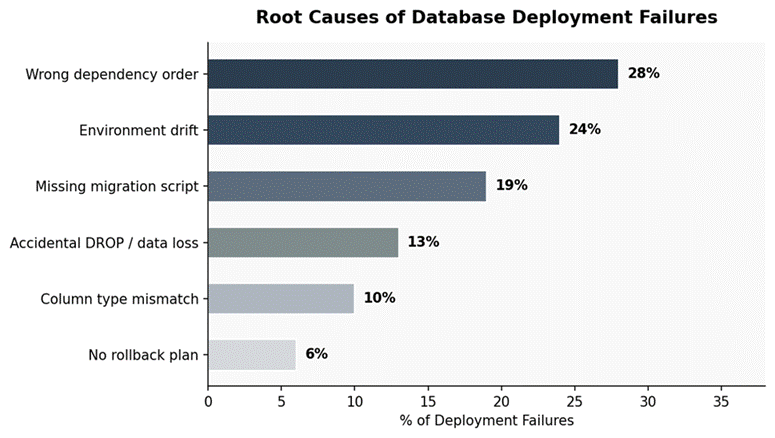
Figure 1: Root causes of database deployment failures — dependency errors and environment drift account for over half of all incidents
The Business Impact: What Manual Database Changes Actually Cost
You might feel you understand the pain points above, but let's look at actual costs so you better appreciate the scale of what's at stake.
Engineering Time
A senior engineer spends 4-8 hours doing database deployment tasks with each release. At 35h/wk, that's weeks' worth of salary per year going solely toward tasks that could be automated.
Deployment Failures
More database outages occur due to manual scripting errors than automated ones combined. And unplanned outages for databases cost companies an average of $100K/hr — easily wiping away months of money spent implementing good DevOps practices. Imagine how much more effective our teams could become if we invested a fraction of those resources into creating great products instead of fighting fires.
Compliance Risk
When SOX, GDPR, or governance regulations come knocking, proving you changed stuff and when adds complexity. There may be hundreds upon thousands of scripts you run regularly but none document their origin well. To avoid potential fines related to non-compliance, you have no choice but to pay extra consultants to keep track of this information carefully.
A Real Failure Scenario
Imagine this: it is Friday. A feature has been waiting for two weeks in the development environment to be released. The senior engineer writes migration scripts from memory. Does a manual comparison of the environment. The quality assurance team passes it. In PROD, it fails.
Why does this happen? Three weeks earlier, someone added a column in the quality assurance environment to fix a bug that was not related to this feature. A change that was never updated in the development environment. The migration script assumes the structure; the change script fails in the middle, and the rollback is done on the spot without a plan.
The release is delayed. The team that reviews what went wrong blames the problem on "environment drift." Nothing is done to prevent it from happening. It happens again the next quarter.
Root Cause: The environment drift that caused this failure would have been found away by an automated schema comparison tool that checks the target environment before the release. This comparison takes a few seconds. The problem it prevents can take a lot of time to fix. Sometimes days.
Why Existing Approaches Keep Failing
Most teams try one of three things. None of them fully work.
Approach 1: Shared SQL Script Files in Version Control
Numbered scripts run in order — Better than nothing, but written by hand, set up manually and unable to detect changes. Any direct change to the environment breaks the source of truth.
Approach 2: Manual Comparison Before Each Release
A DBA manually checks DEV and PROD. Creates the sync script, which is a common method and the most unstable. It does not scale with the team, as it depends entirely on one person's accuracy.
The Core Problem: All of them rely on a person to identify and document schema changes. A modern schema comparison tool automates change detection, dependency validation, and deployment planning.
Best Practices for Database CI/CD — And How 4DAlert Implements Them
The following practices build the base of a database deployment process. For each one we show how 4DAlert uses it. Not as a sales message. As a real example of what good tools actually look like.
1. Save Configurations — Do Not Repeat Manual Setup
Every check, between environments should be able to be done again without entering the same details again. If your team is typing in source, target, object types and choices before every check that setup itself is a source of mistakes.
How 4DAlert does it:
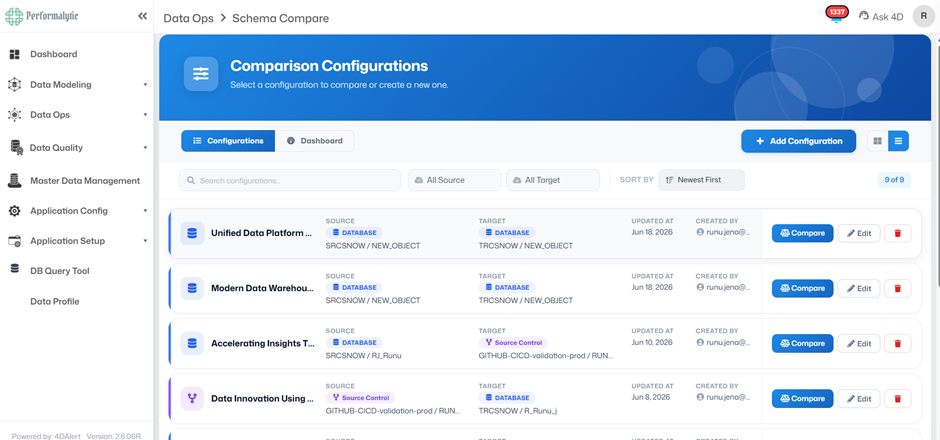
Comparison Configurations
4DAlert begins with saved Comparison Settings. Source, target, object types and choices saved once and used again
every time. Teams doing checks open a saved setting and compare with one click. The setting keeps track of who made
it when it was last changed and the full list of what gets checked.
2. Compare in Every Direction — Database and Source Control
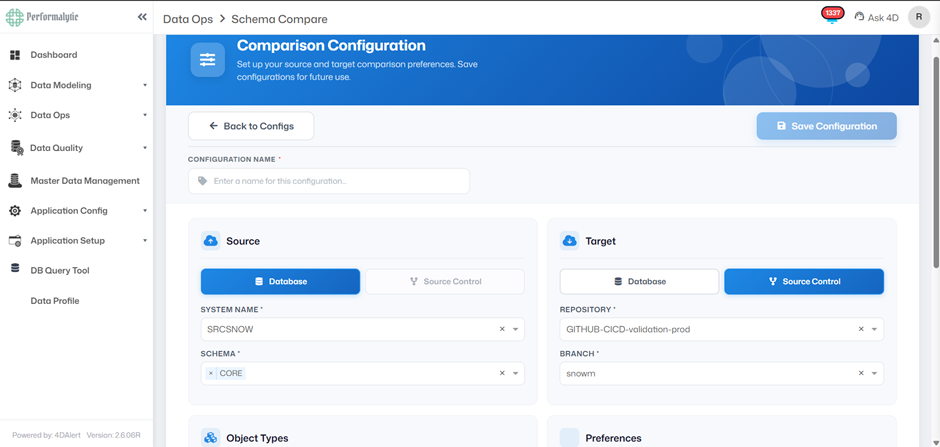
A good schema compare pipeline must work in directions. This means it has to compare the source control and the live database before something is deployed. It also has to compare the database and the source control when there are direct changes that have not been committed. It has to compare live databases when there are differences between environments.
How 4DAlert does it: Three
Comparison Modes
4DAlert does it in three comparison modes. The Database-to-Database mode compares two environments, like the
development environment and the production environment. The Database-to-Source Control mode checks if a live
database matches the Git repository or if there are changes. The Source Control-to-Database mode is the check before
something is deployed, where a release branch is compared to the target.
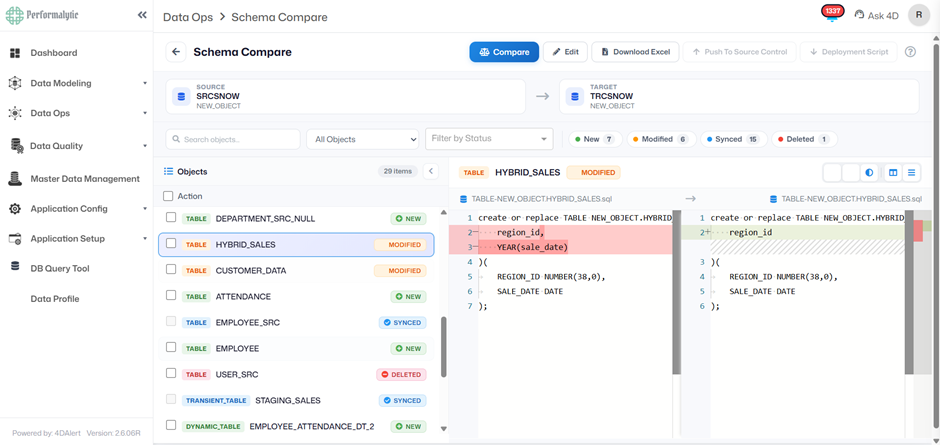
3. Get a Clear, Object-by-Object Diff
The source and target can both be a database or a Git branch and 4DAlert treats them as equal sources of truth. The output of a schema comparison should be clear and easy to understand. Each object should have a status and there should be no guessing about the differences or how the deployment will behave. The minimum standard is a side-by-side comparison of the DDL diffs with line-level highlighting.
How 4DAlert does it:
Four-Status Comparison Output
4DAlert does it with a four-status comparison output. It labels each object as new, modified, synced or deleted.
When you select an object it opens a side-by-side DDL diff with the changes highlighted line by line.
4. Auto-Generate Deployment Scripts in Dependency Order
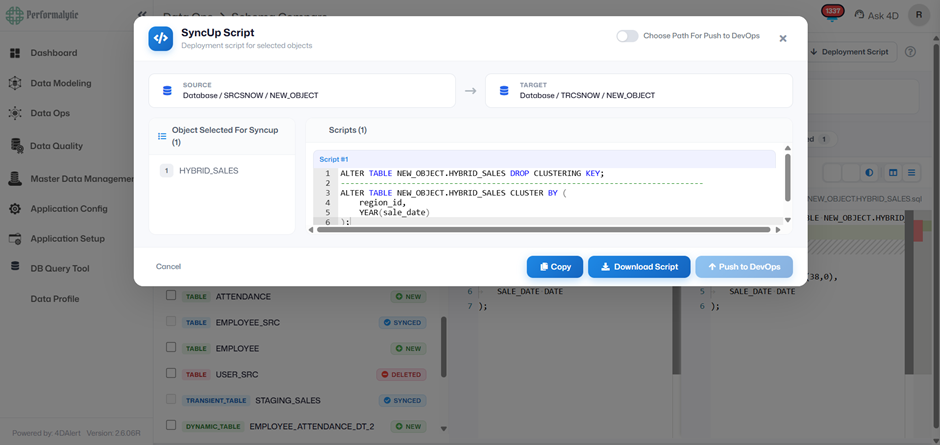
Hand-written ALTER scripts are exactly where errors creep in. A good schema compare pipeline should generate the deployment script automatically. This script should be a sequenced and dependency-aware plan, not a list of statements. For example views should be created after the tables they depend on and stored procedures should be deployed in the order. At a scale this is not something a person can reliably do.
How 4DAlert does it:
Auto-Generated SyncUp Script
4DAlert generates a SyncUp Script, which's a deployment-ready SQL file. This file is correctly sequenced for the
target database engine. You can copy it, download it, or push it directly to GitHub Actions or
Azure DevOps
with one
click.
5. Never Let DROP Statements Execute Silently
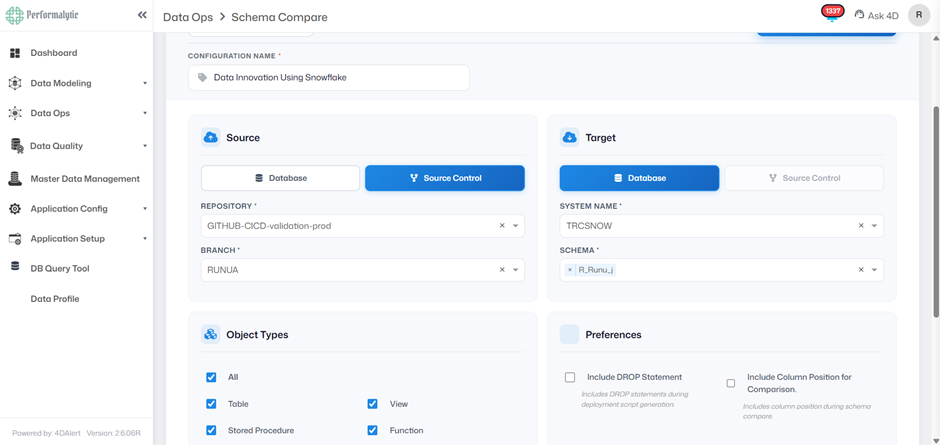
Destructive operations should be visible. Require explicit approval. DROP statements should be commented out in the deployment script by default. This way they are visible. Flagged, but not executable until someone manually uncomments them.
How 4DAlert does it: Include
DROP Statement Setting
4DAlert does it with an Include DROP Statement setting. By default it generates DROP statements as commented-out
SQL. They are visible in every comparison result, but not executable until someone manually uncomments them. Teams
that have already reviewed and approved changes can enable the "Include DROP Statement" preference to make them
live.
6. Cover All Object Types — Not Just Tables
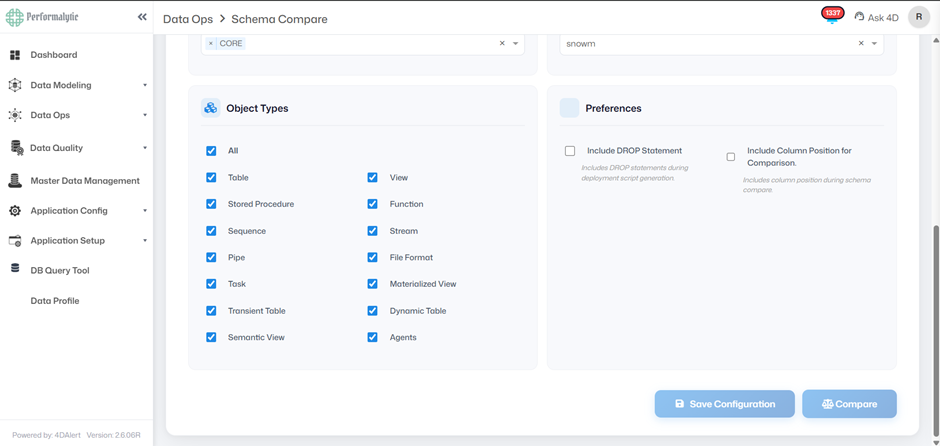
Real databases have a lot of components including views, stored procedures, functions, sequences, streams, pipes, tasks, materialized views and dynamic tables. A schema compare tool that only compares tables misses most of the places where differences can happen.
How 4DAlert does it: Full
Object Type Coverage
4DAlert supports a lot of object types, including Tables, Views, Stored Procedures, Functions, Sequences, Streams,
Pipes, File Formats, Tasks, Materialized Views, Transient Tables, Dynamic Tables, Semantic Views and Agents. Each
object type can be included or excluded per comparison so teams can choose what each pipeline run checks.
7. Support Your Entire Data Stack — Not Just One Database
Most companies use databases across cloud and on-prem, relational and non-relational. A schema compare tool that only works with one engine requires processes for every other database.
How 4DAlert does it: 12+
Supported Database Platforms
4DAlert supports over 12 database platforms, including Snowflake, SQL Server, Oracle, PostgreSQL, MySQL/MariaDB,
Azure Synapse, Amazon Redshift, Google BigQuery, MongoDB, Databricks, IBM Db2 and SAP HANA. The same comparison
logic, script generation and CI/CD integration works across all these platforms from a tool.
8. Maintain a Full Audit Trail for Compliance
Teams that have to follow rules like SOX, GDPR, DORA or internal data governance need to keep a record of every change they make to their database schema. This record has to include what changed, what script was used, who made the change and if it worked or not. You cannot make this record after the fact by trying to remember what happened or by looking at SQL files in a folder.
How 4DAlert does it:
Automatic Audit Trail
The way 4DAlert does this is by keeping a record of everything that happens. Every time 4DAlert compares or deploys
something it logs what changed, what script was used, who made the change and what happened. This is not something
you can turn off. It is always on by default. This gives teams that have to follow rules an accurate record of
everything that happens without having to do anything manually.
What the Full Pipeline Looks Like
When you have practices in place and you use a tool like 4DAlert with your CI/CD system, deploying changes to your database is no longer a manual process. It becomes like every other part of your automated pipeline.
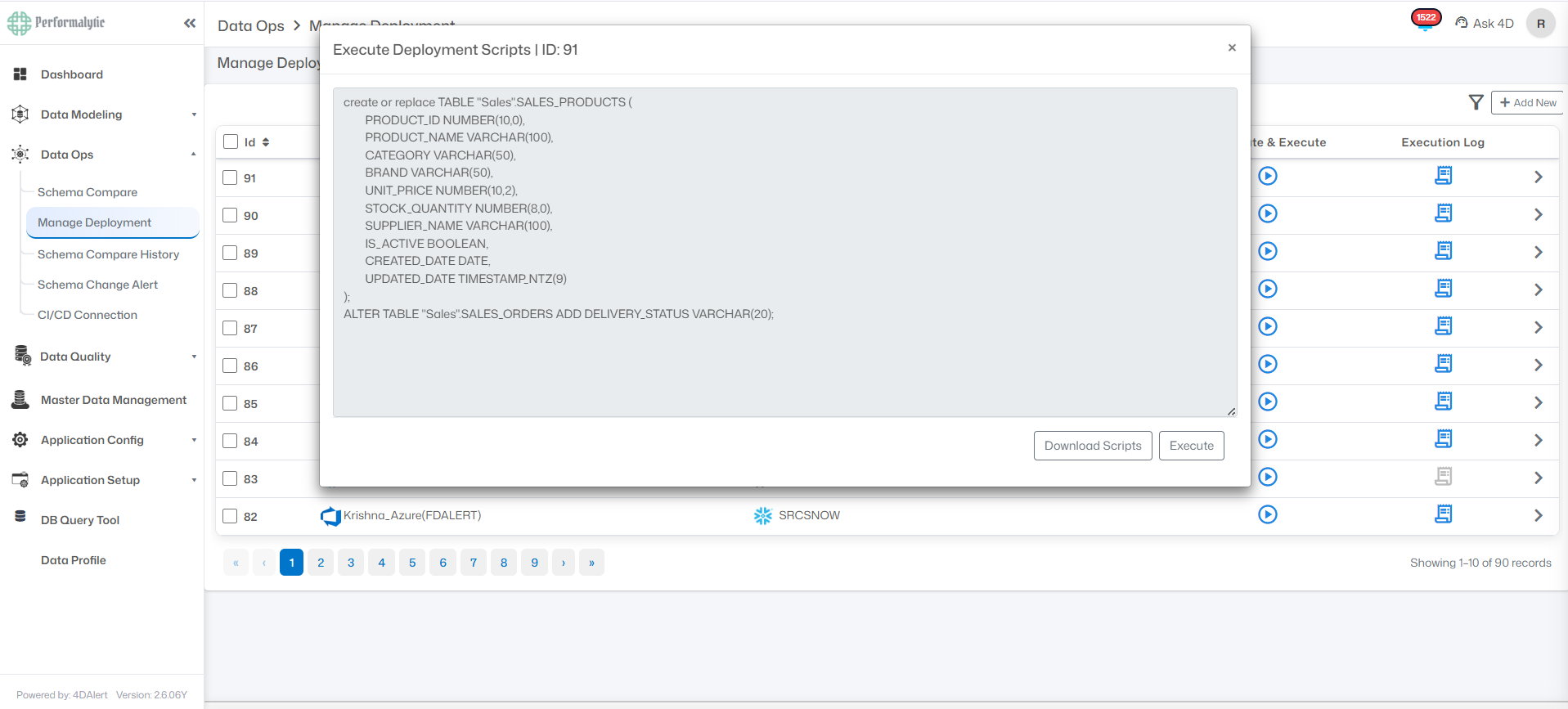
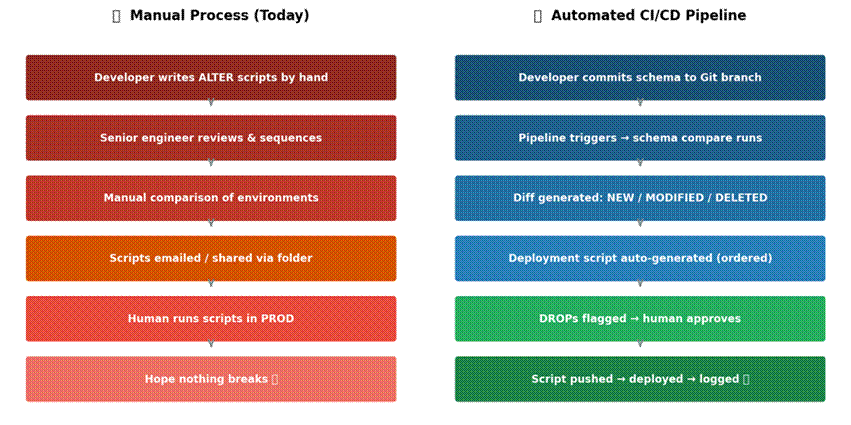
Figure 2: Manual database deployment process (left) vs. an automated Database CI/CD pipeline (right)
4DAlert works directly with GitHub Actions and Azure DevOps. When you make a change to your database schema it automatically runs a comparison as part of your pipeline. This happens when you commit a change or make a pull request. You do not need to log in manually.
- A developer makes a change to the database schema. Commits it to a branch.
- The pipeline: 4DAlert automatically runs a comparison.
- It identifies what is new, what has changed, what is the same, and what has been deleted across all types of databases.
- It generates a script to make the changes. It makes sure the script is in the right order for the database engine.
- If the script includes anything that could cause problems, like dropping a table, it flags it. Sends it to a person for approval.
- If the person approves the script, it is sent to DevOps. Deployed to the target environment.
- A complete record of what happened is kept, including what script was run, who approved it, and if it worked or not. Notifications are also sent to developers, database administrators and other stakeholders.
The result is a process for deploying changes to your database that is automated, tracked and reviewable before anything goes to production.
How to Choose a Schema Compare Tool
Not all tools to compare database schemas are the same. When you are looking for a tool there are some things you should consider that separate real tools from ones that only work in demonstrations.
Full object type coverage. Tables and columns are the minimum. Real environments have views, procedures, sequences, streams, tasks, dynamic tables, and more. A tool that misses object types will miss drift.
Declarative script generation. The tool should determine the correct path (CREATE vs ALTER), handle dependency order, and flag risk — not just list differences and leave the scripting to you.
DROP protection enabled by default. Destructive operations must be explicitly approved. Commented-out by default, flagged clearly, never silent.
Multi-database support. If your stack includes more than one database engine, your schema compare tool should cover all of them under one workflow.
Direct push to DevOps. Generated scripts should go directly to GitHub Actions or Azure DevOps — not a download folder that someone manually uploads somewhere else.
Conclusion
Most engineering teams still do database changes manually even if they automate everything else. This is where the senior engineers spend their time, where the most problems happen, and where it is hardest to follow the rules.
The good news is that there are tools now that can help. Tools like 4DAlert can compare database schemas, generate scripts automatically, protect you from dropping something, handle multiple types of databases, and keep a complete record of everything that happens. This can change the process without changing the team, the stack, or the infrastructure.
Automating database changes is not something you can do later. It is something you should do now. For teams it is the last step in automating their pipeline, and it is long overdue.
Frequently Asked Questions
What is Database CI/CD Pipeline Automation?
Database CI/CD Pipeline Automation applies Continuous Integration and Continuous Delivery principles to database changes. It automates schema comparisons, deployment script generation, validation, version control, and release workflows, helping teams deploy database changes consistently across environments.
Why do database deployments fail?
Database deployments commonly fail because of schema drift, manual migration scripts, missing object dependencies, deployment order issues, untracked production changes, and insufficient rollback planning. Automated validation helps identify these risks before deployment.
How is Database CI/CD different from application CI/CD?
Application CI/CD focuses on compiling, testing, and deploying application code. Database CI/CD manages schema changes, stored procedures, views, functions, migration scripts, and other database objects while ensuring version control and deployment consistency.
What is schema drift?
Schema drift occurs when database environments gradually become inconsistent because changes are made manually or deployments are skipped. Over time, development, QA, and production databases no longer share the same schema, increasing deployment risk.
What databases support Database CI/CD?
Modern Database CI/CD solutions support enterprise platforms such as Snowflake, SQL Server, Oracle, PostgreSQL, MySQL, MariaDB, Amazon Redshift, Azure Synapse, Google BigQuery, Databricks, IBM Db2, SAP HANA, and others.
Why is schema comparison important before deployment?
Schema comparison identifies differences between source and target environments before deployment. It helps detect missing objects, modified schemas, unexpected production changes, and potential deployment conflicts before they cause failures.
Can Database CI/CD improve compliance?
Yes. Automated deployment pipelines maintain version history, audit logs, deployment records, approvals, and change tracking, making it easier to meet compliance requirements such as SOX, GDPR, and internal governance policies.
How does 4DAlert support Database CI/CD?
4DAlert automates schema comparison, deployment script generation, dependency analysis, schema drift detection, GitHub and Azure DevOps integration, audit logging, and real-time schema change notifications, helping organizations build a reliable database deployment pipeline.