
Table of Contents
Author
Nihar Rout
Managing Partner 4DAlert
Introduction
One of the most frequent reasons for CI/CD pipeline failures is database changes. Application code is automatically versioned, reviewed, tested and deployed. The database, more often than not, still relies on some individual to write the ALTER scripts, sequence them properly and push them to production without error. That person is typically the most senior engineer, and he’s spending his Friday afternoon on work that should’ve been automated years ago.
It’s not just about inefficiency. It’s a risk. Each manual change from developer to production is a potential point of failure — missing a dependency, running a DROP that shouldn’t have been, silently truncating data because of a column type change. The teams who have had a production failure due to a poor migration script don’t forget it. And a lot of them are still doing it the same way next quarter.
The industry has addressed this issue for application code. Continuous Integration, automated testing and deployment pipelines are the norm. However, the database has been a dark corner for a long time, partly because schema changes are more risky and partly because the tooling to automate the changes safely has been less mature or complete.
That’s changing. This blog explains what schema compare tools are, how they can be used in a modern CI/CD pipeline, and how to differentiate the good from the bad. We illustrate how 4DAlert does this in practice along the way.
Why Database Changes Break Pipelines
If multiple developers are developing the same database at the same time, where each developer is making changes to tables, views, stored procedures or functions, merging those changes is not as easy as it sounds. The questions that arise in each release are:
> | Which changes happened in DEV that haven’t reached QA or PROD yet? |
> | Are there conflicting modifications to the same object across branches? |
> | What is the correct sequence to run scripts without breaking dependencies? |
> | Did anyone change a column type in a way that causes data truncation? |
> | Is there a DROP statement hiding somewhere that nobody explicitly approved? |
If you don’t have tooling, the answers to these questions will be found by comparing environments, reading through SQL files and on the basis of who has the most institutional knowledge. That process isn’t scalable and that’s what gap schema compare tools are designed to fill.
Start with a Saved Configuration, Not a Blank Form
4DAlert begins with Comparison Configurations — source, target, object types, and preferences saved once and reused every time. Teams running recurring comparisons don’t re-enter connection details on every run; they open a saved configuration and compare.
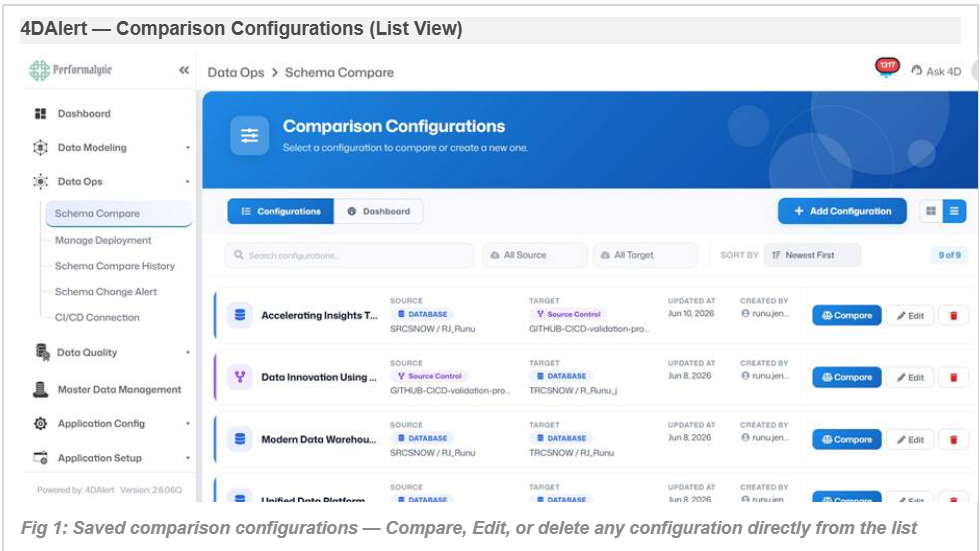
For each configuration saved, the source, target, last updated date and the name of the user who created the configuration are displayed. Compare is executed with the same settings as before with only one click. No need to re-enter object type selections, schemas, or system names.
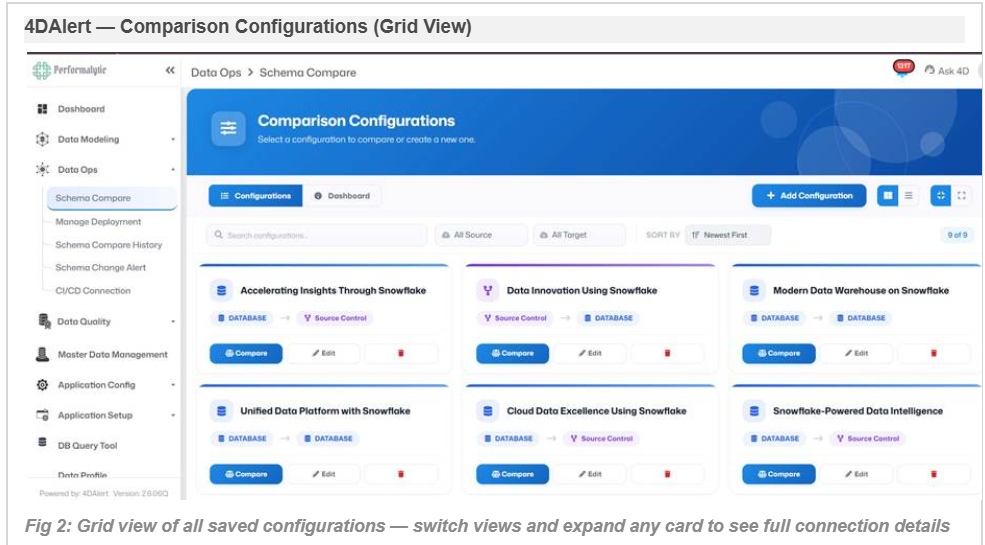
Whether it’s database-to-database, database-to-source-control, or source-control-to-database, configurations can be made for all common directions a team needs to compare, including validating a release branch against production or syncing two live environments
Setting Up a Comparison — Source, Target, and Scope
There are a few fields to create or edit a configuration in 4DAlert: a configuration name, a source and a target. Both sides can be a live Database connection or a Source Control branch providing complete flexibility in comparison team structure.
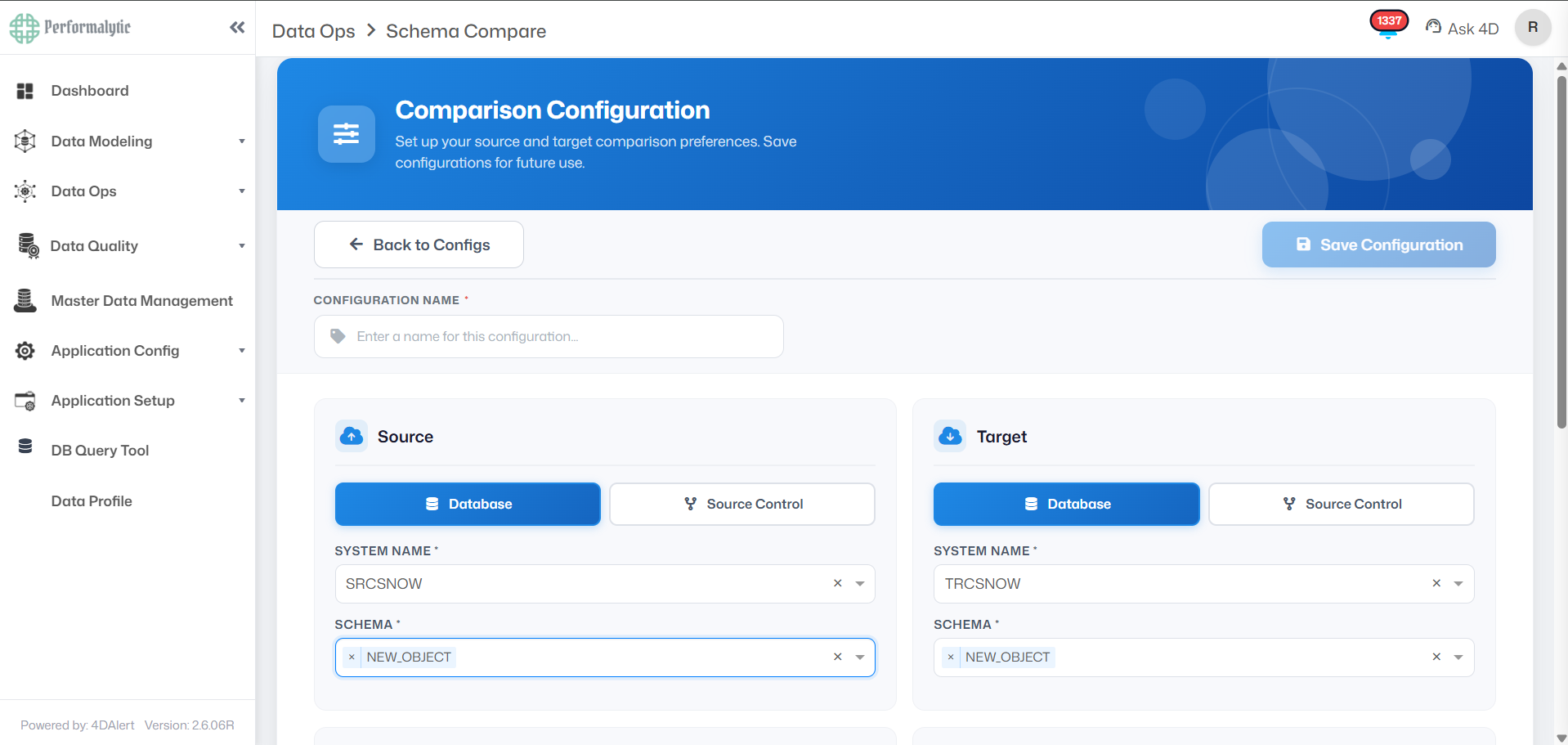
Below the source and target fields, the same configuration screen lets you scope exactly what gets compared and how destructive changes are handled:
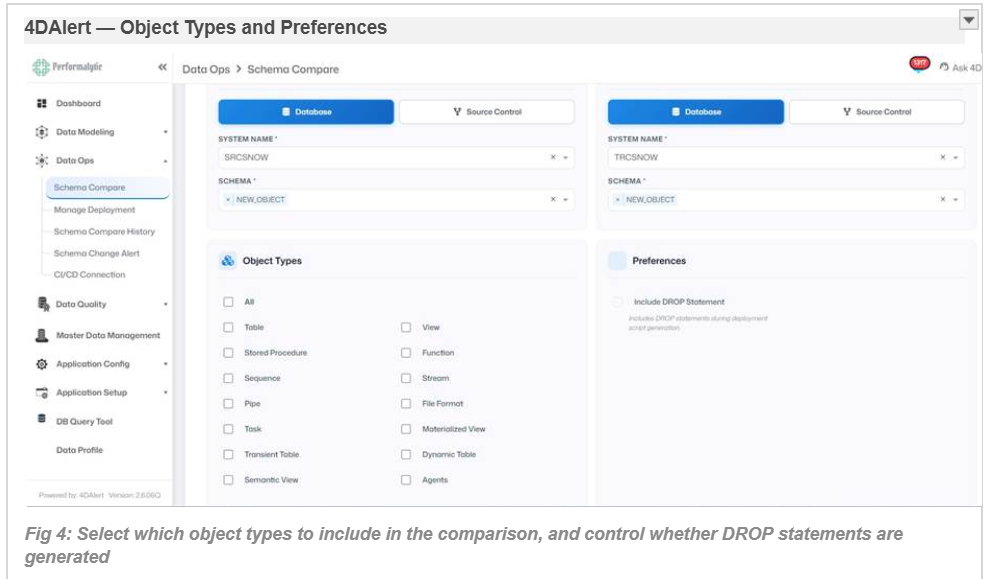
The full list of supported object types includes Tables, Views, Stored Procedures, Functions, Sequences, Streams, Pipes, File Formats, Tasks, Materialized Views, Transient Tables, Dynamic Tables, Semantic Views, and Agents — giving teams complete control over what is and isn’t in scope for each comparison run.
Three Ways to Compare — Database or Source Control, Either Side
With Source and Target both having the option to be set to Database or Source Control, teams have three different comparison scenarios from the same configuration screen covering all directions a release workflow actually needs:
✓ | Database → Database – Compare two live environments directly, e.g. DEV vs PROD, to identify drift between live systems.. |
✓ | Database → Source Control – Compare a live database to a Git branch to make sure that the database is the same as the one in source control, or to create a script that updates source control with a live environment. |
✓ | Source Control → Database – Compare a Git branch or repository with a live database — the most common pre-deployment step, to ensure that a release branch is ready for pushing to a target environment. |
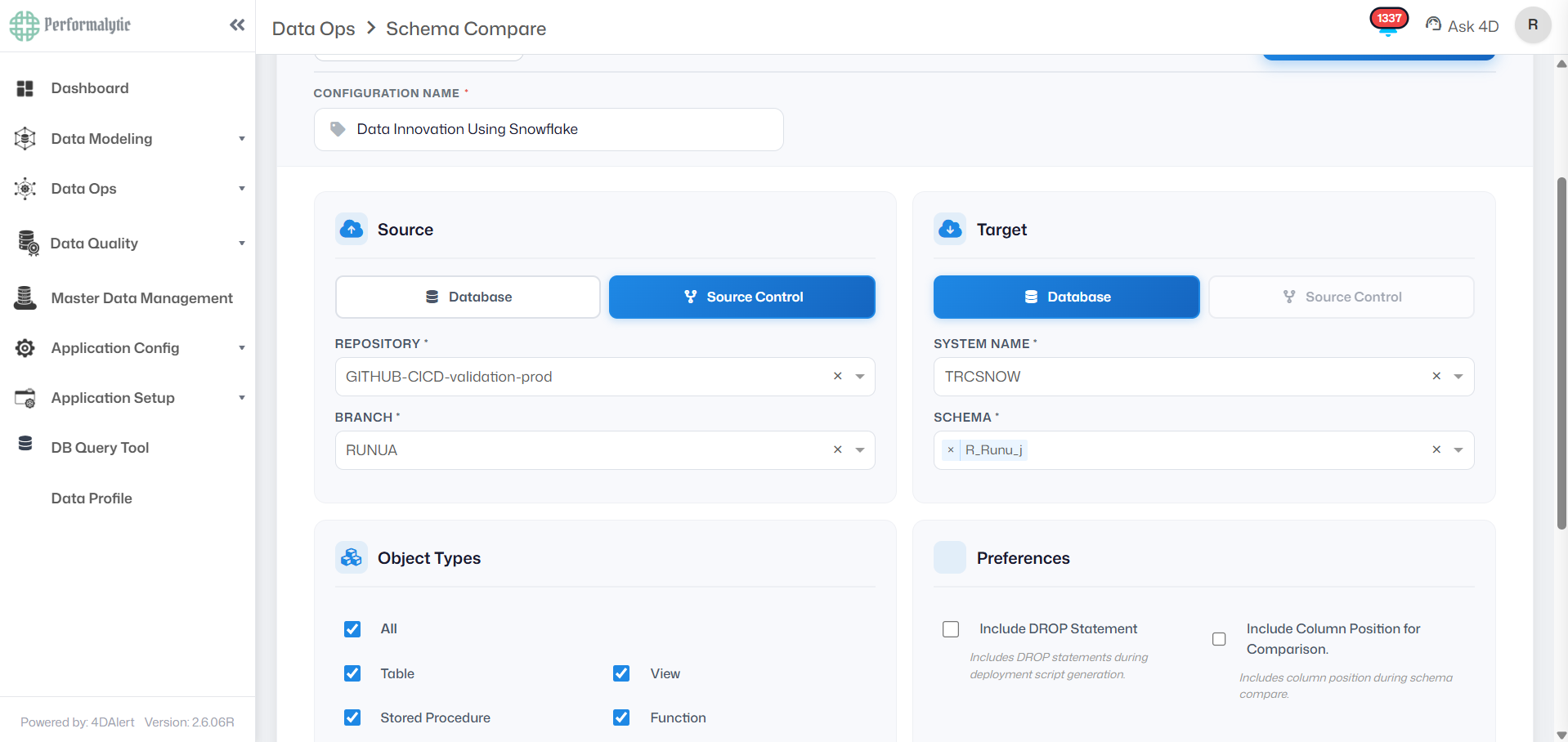
In both cases, the Repository and Branch fields replace System Name and Schema for whichever side is set to Source Control. Object type selection and preferences work identically regardless of which combination is chosen — the comparison engine treats a Git branch and a live database as equivalent sources of truth.
Include DROP Statement — Controlling How Destructive Changes Appear
Another preference that directly affects the deployment script generated is Include DROP Statement, which sits alongside Include Column Position. This setting will affect whether the dropping of a table, column, or other object that exists in the target but not the source is included in the SyncUp Script as live, executable SQL or is commented out as a visible warning.
Include Column Position — A Preference Worth Understanding
Among the comparison preferences sits a setting that’s easy to overlook but changes results significantly: Include Column Position for Comparison. This preference applies specifically to Tables, Transient Tables, and Dynamic Tables in Snowflake, and it controls whether column order counts as a difference.
Comparison Output — Four Clear Statuses
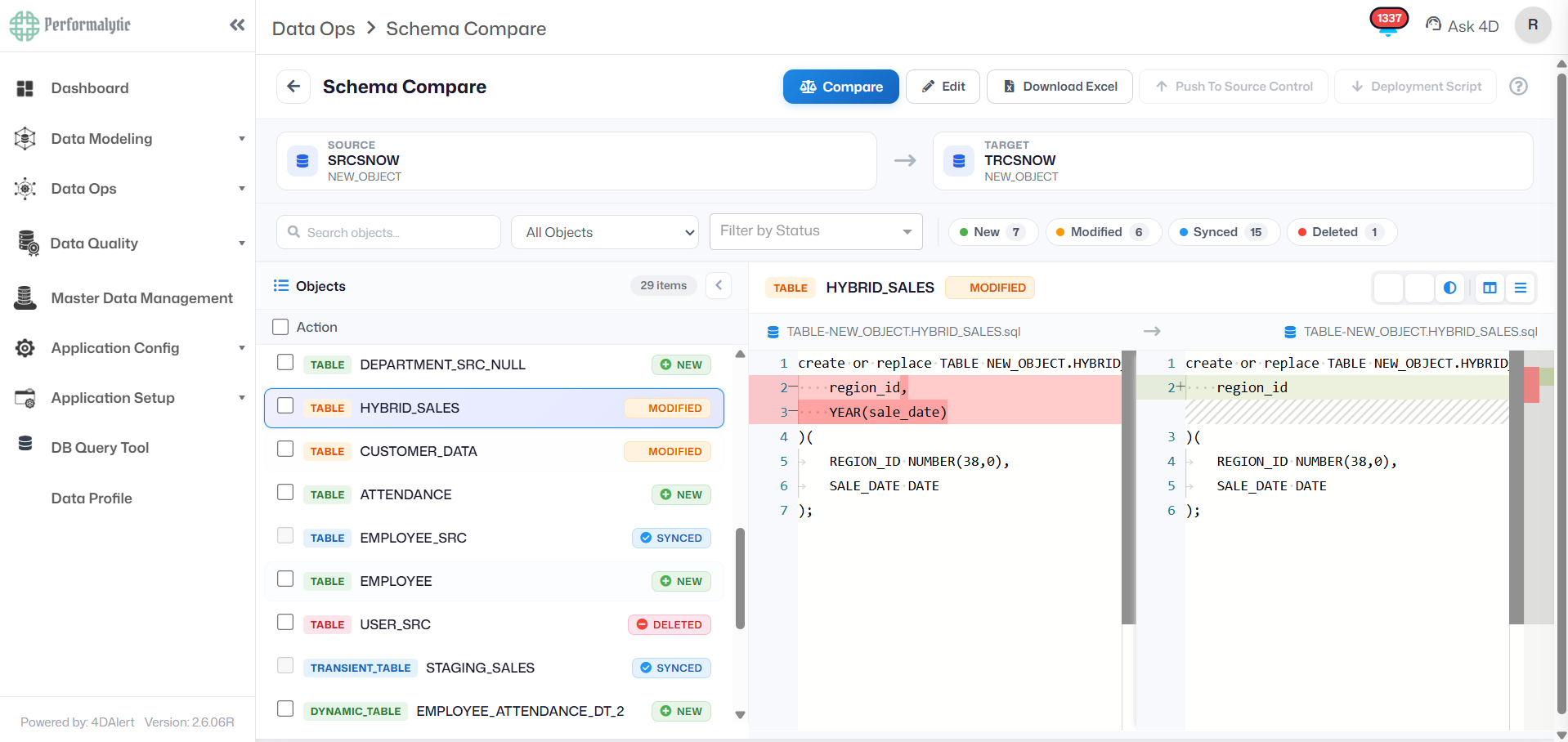
Running a saved configuration produces an object-by-object breakdown. Every object in 4DAlert’s Schema Compare is tagged with one of four statuses:

Selecting any object opens a full side-by-side DDL comparison, with additions and removals highlighted line-by-line — exactly what changed, with no ambiguity about what the deployment script will do.
From Diff to Deployment Script — Automatically
Knowing what is different is only useful if you can act on it. The best result of any schema compare workflow is a deployment-ready SQL script — one that can be reviewed, approved and executed without anyone having to write a single line of SQL by hand.
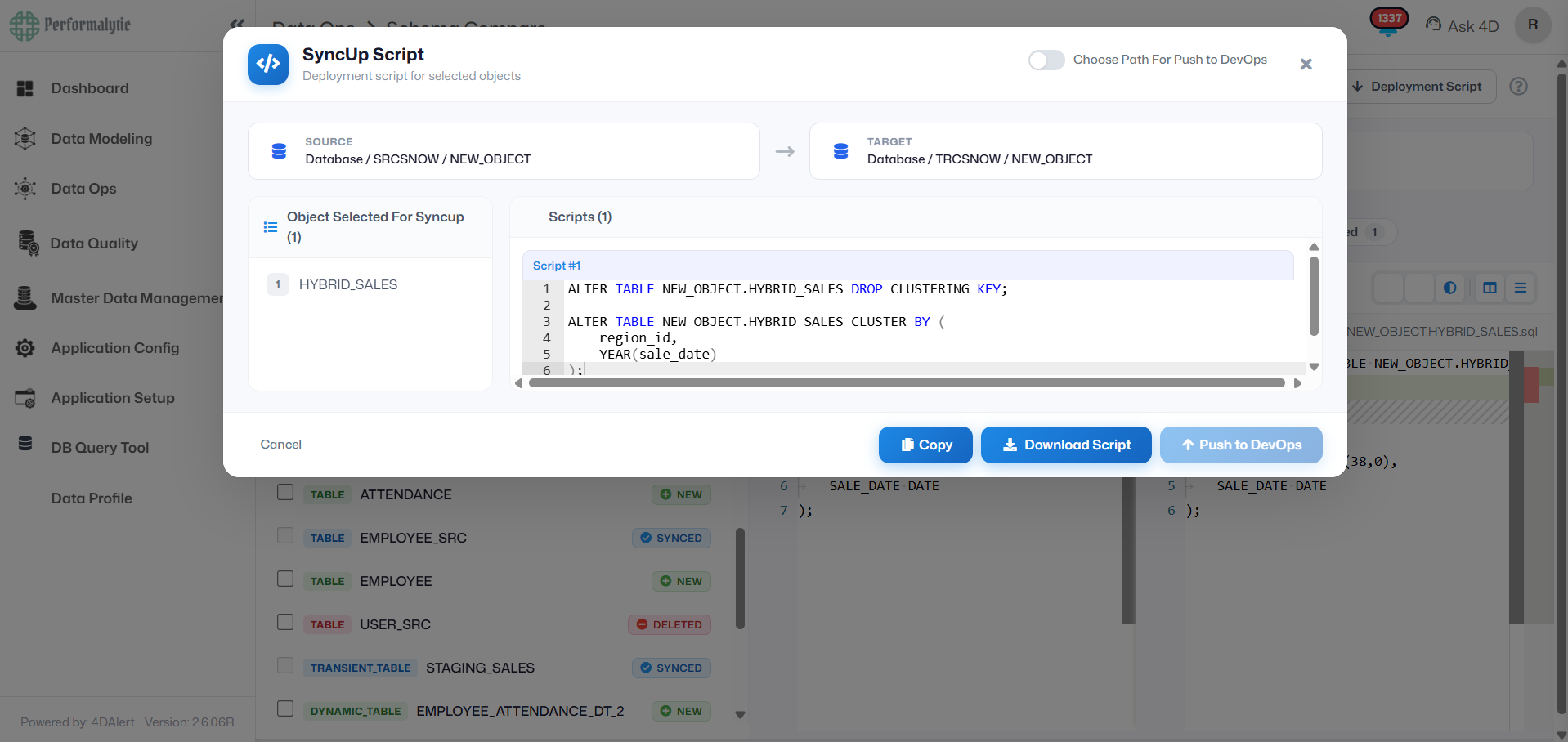
The SyncUp Script can be copied directly, downloaded as a file for manual execution, or pushed straight to source control — Git, Azure DevOps, or any connected CI/CD pipeline — with a single click. There’s no separate export step and no manual file handling between comparison and deployment.
The SyncUp Script is not just a list of SQL statements. It is a sequenced, dependency-aware deployment plan — generated in seconds, not hours.
Supported Databases — Built for Every Modern Data Stack
4DAlert is built as a multi-database platform from the ground up. Most enterprise environments don’t run a single database — they run several, often across cloud and on-premise, relational and non-relational. 4DAlert consolidates schema management for all of them under one comparison and CI/CD workflow:
Real Business Impact
Automating schema management is not just a developer quality-of-life improvement. It has direct, measurable consequences for the business — in time saved, risk reduced, and revenue protected.
One enterprise customer — a manufacturer with over 5,000 database objects across multiple Snowflake environments and development teams in different time zones — reached these numbers after implementing 4DAlert’s schema compare pipeline. The team didn’t change. The stack didn’t change. Only the process did.
The business consequences of not automating are equally concrete:
Common Schema Compare Use Cases
4DAlert’s Schema Compare is used across a wide range of scenarios — from routine pre-release environment syncing to compliance-driven audit requirements. Here are the six most common:
Where This Fits in Your CI/CD Pipeline
4DAlert integrates directly with GitHub Actions and Azure DevOps. Schema compare runs automatically as part of your existing pipeline — triggered by a commit or pull request, with no manual login required:
How to choose a Schema Compare Tool.
✓ Covers the actual object types. Tables and columns are self-explanatory. There are views, procedures, sequences, streams, tasks, dynamic tables and more in real environments.
✓ Declarative script generation. The desired end state is defined. The tool identifies the correct path (CREATE vs ALTER), dependency order, risk flagging.
✓ The DROP protection is enabled by default. Destructive operations must be explicitly approved, commented out and flagged. Never silent.
✓ Multi-database support. If you are using more than one database engine with your stack, your schema compare tool should include all of them.
✓ Immediate push to DevOps. Generated scripts are directly uploaded to GitHub Actions or Azure DevOps — not a download folder that is manually uploaded.
✓ Full audit trail. All changes recorded – what ran, who activated it, pass/fail. Essential for SOX and GDPR.
✓AUDIT TRAIL is the compliance requirement which most tools are missing.
All schema changes performed by 4DAlert are recorded, including what changed, what script was used, who initiated the change, and the success or failure of the change. This is not an option for teams that are subject to SOX, GDPR or their own data governance requirements. It is what manual deployment processes can’t structurally provide.
Conclusion
Industry Trends: This problem is only going to get worse.
The need to automate database schema management is growing at an increasing pace, bolstered by three forces that are coming together: increasing data complexity, more stringent regulatory demands, and greater demand for engineering velocity.
→ Database DevOps adoption
By 2026, more than 70% of organisations will have formalised database change automation as a component of their DevOps practice, up from less than 30% in 2022, says Gartner.
→ Multi-cloud data platforms
Today, most enterprise data teams have two or more cloud database platforms running at the same time. Schema management tooling that is limited to a single platform is becoming less and less effective.
→ A strong focus on regulation of data
Verifiable audit trails are essential for data structure changes across all regulatory frameworks, including SOX, GDPR, DORA, and new AI governance laws.Verifiable audit trails are crucial for data structure changes in all regulatory frameworks, such as SOX, GDPR, DORA, and new AI governance laws. This is not possible at scale with manual processes.
→ Move data teams to the left.Move data teams to the left!
The same shift-left philosophy that brought testing earlier into the application pipeline is now bringing schema validation earlier — before it gets to production.
Why This Problem Matters — Now!
Most engineering teams have a database as the final manual process in an otherwise automated delivery pipeline. It is the place where the most time is spent by experienced engineers, where the most incidents in production occur, and where it is most difficult to meet compliance requirements. It’s not a nice-to-have to solve it. It’s the last of the full DevOps practice.
The benefits of automating schema management are compounded: quicker release cycles, reduced incidents, reduced compliance effort, and engineers who can work on product instead of migration scripts. The teams that aren’t taking a cost — one that is hidden, but one that is ongoing — in terms of time, in terms of risk, and in terms of engineering talent that eventually goes elsewhere where it isn’t as frustrating.
