

Table of Contents
Author

Nihar Rout
Managing Partner 4DAlert
Alert Members of the Analytics Team and Business Stakeholders of any Database Schema Changes in your Modern data stacks which include Snowflake, Fabric, Azure SQL Server, Synapse, Oracle databases, and others.
In a large organization, data analytics development teams consist of several members. Most often, members are located across multiple regions, locations and time zones. In addition, as the line between business stakeholders and technical development teams gets blurred, many times it becomes essential for stakeholders to be informed of any change in Database structure and Schema as soon as any change is deployed to the database.
As the analytics team tries to automate the CI/CD process, schema compare, and database change deployment, it is not always easy to keep everyone informed of any change and all the details of the schema changes. Without an automated process, the team tries to inform via team meetings or conference calls or an email which is not always possible, often delayed and also not detailed enough.
If all the members in the team are not informed of any changes to the database structure, then it creates confusion, duplicate work, and sometimes errors in development.
Before we look at how to send automated notifications for any CI/CD change, let’s review how to automate CI/CD process, Schema compare, and database change deployment. I have written this in my previous blog but let me summarize the process again.

4DAlert — Cloud based solution that automates DataOps, CI/CD processes, schema compare and database change deployment
Your Current Half-Automated and Manual Process — Not So Good Process
Most analytics teams adopt an internal CI/CD pipeline process which in many ways is nowhere close to automated! Members extract their DDL scripts manually from the database, add all the script in sequence into a text file, a senior member (whom we could call a change manager) takes all the scripts and consolidates the scripts into one single file and then uploads the scripts into DevOps or GitHub folder and then the pipeline takes the script and executes the changes.
Drawbacks in the Above Process
⦿ The process is nowhere close to automation.
⦿ Generating scripts, putting all scripts in sequence, a designated change manager reviewing each script and consolidating all into one script are highly labor-intensive and error-prone.
As the process is not automated, teams move the changes infrequently, causing delay in new database change deployment and realizing the value of the data and investment.
4DAlert: Automated CI/CD, Schema Compare, and Change Deployment Process
4DAlert, a Cloud-native DevOps automation tool, automates CI/CD, schema compare, and database change deployment for Snowflake, SQL Server, Oracle, and many other databases.

4DAlert’s Schema Compare Tool Helps You Identify Dependent Objects
⦿ Solution provides an intuitive user interface for the development team to compare schema, identify the changes, and object dependencies.
⦿ Developers could leverage the user interface to choose the changes they want to move to a higher landscape and push the changes to source control tools such as GitHub or Azure DevOps.
⦿ Solution follows a Declarative method, i.e., at any point it would move the most recent CREATE DDLs scripts to source control and when ready to deploy changes to the target database, it compares the most recent CREATE script stored in source control with the target database and generates the ALTER scripts for deployment. This improves Database release automation and overall Database observability.
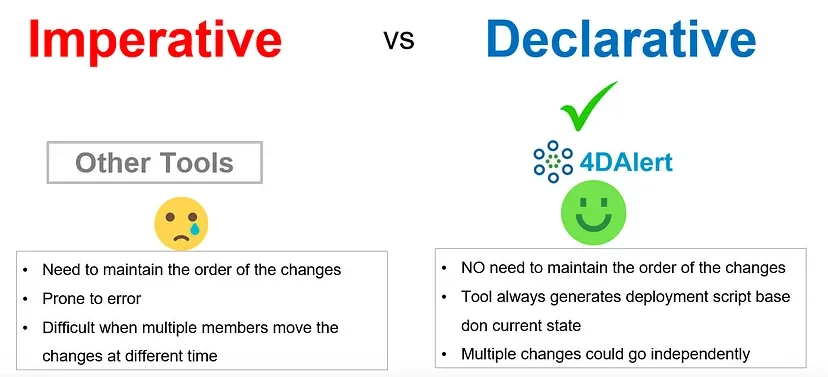
4DAlert’s Declarative Method to Generate Deployment Script
⦿ Once the deployment script is generated, the changes are deployed in the target database in automatic fashion.
⦿ The solution also comes with a set of APIs. If organizations want to integrate the process into any of their own DevOps process, they could leverage the 4DAlert APIs to push the code to source control, generate deployment scripts, and then deploy the changes using 4DAlert’s secured APIs.

How Could We Automatically Send Notification of Any Schema Changes After Each Deployment?

As organizations deploy the 4DAlert solution to automate the CI/CD, schema compare, and automatic change deployment, team members and business stakeholders could subscribe to the notifications process. As soon as the CI/CD pipeline deploys the changes, the solution would automatically send the copy of all DDL scripts and deployment scripts and their status to show whether it passed or failed — enabling automated schema change notifications.
Automated Email on All DDLs Executed in Database with Pass/Fail Status
The above notification process keeps everyone involved informed, avoids duplicate effort, and moreover gives clarity on what changes were deployed. This way the development team, business stakeholder, and end users are immediately aware of the changes and start leveraging the new functionality immediately after that.

This process democratizes the CI/CD process, keeps the process transparent, and increases database observability.
Conclusion
In order to bring transparency, keep everyone informed of any deployment, and democratize the database schema change deployment, it is essential for organizations to automate the CI/CD process end to end and have an automated notification process.
(If you’re facing challenges in getting there, this blog on CI/CD database change obstacles outlines the most common blockers and how to overcome them.)
This process allows every member of the team to understand the DDL changes deployed so that they can adjust their work, avoid duplicate work, and minimize confusion in the schema change process. This automation increases overall productivity of the team, delivers functionalities much faster, and helps organizations get the most value out of the analytics investment.