
TL;DR
Key takeaways
- Automated data reconciliation continuously compares data across systems to detect mismatches, isolate the affected records and trace likely causes, without rebuilding the check by hand each time
- Most teams still rely on spreadsheets, per-system scripts or row counts, and all three miss wrong values, near-duplicates and slow drift once schemas change
- In BlackLine's 2024 survey of more than 1,300 finance leaders, almost 40% of CFOs did not completely trust their organization's financial data, with too many data sources (31%) and spreadsheets (27%) named most often
- 4DAlert runs reconciliation as an agentic workflow — compare, match, baseline, detect, trace and log — so the process adapts to changing data instead of breaking on it
- AI agents act on data without anyone reviewing each step, so AI readiness now requires data that is consistent, complete, stable and traceable
In BlackLine’s 2024 survey of more than 1,300 finance leaders, almost 40% of CFOs said they do not completely trust the accuracy of their organization’s financial data.
AI agents are starting to do real work inside the enterprise. They approve requests, route orders, update records, and trigger workflows faster than any team could review. That speed is the promise. It is also the risk, because every action depends on data that somebody assumed was correct.
Automated data reconciliation is the continuous comparison of data across systems to detect mismatches, isolate the affected records, and trace likely causes, without rebuilding the check by hand each time. 4DAlert, an AI-powered enterprise data management platform, does this with a reconciliation engine built for cloud data platforms.
Here is the scenario. It is quarter end, and finance compares revenue in the warehouse with billing. Row counts match and the pipeline shows green. Two weeks later, a customer disputes an invoice, and you learn one region has been off the whole time. A handful of upstream changes shipped in that window, and any of them could be the cause.
Now what?
What Is Data Reconciliation?
Data reconciliation is the process of comparing data between a source system and a target system to confirm that they agree. It finds mismatches, missing records, and inconsistencies as data moves through pipelines, warehouses, lakes, and SaaS applications. In cloud data platforms it is not a one-time check, because data keeps changing and the comparison has to keep running. Source-to-target reconciliation is the most common form, and data reconciliation software automates it so teams do not have to rebuild the check each time.
Four Workarounds Teams Rely On, and Where Each One Breaks
Most teams handle this in one of four ways, and all four still show up in production:
- Spreadsheets and ad hoc SQL: Teams extract datasets from source and target systems, write comparison queries, and manually investigate differences. This approach lacks a centralized reconciliation process, reusable validation logic, and consistent execution logs, and as the number of tables, sources, and rules grows, query maintenance and exception analysis get harder.
- A custom script per system pair: Each source-target combination needs its own comparison logic, so script maintenance grows as systems, schemas, and rules change.
- Row counts and pipeline status: These checks find missing or extra rows but cannot detect incorrect field values when record counts stay the same.
- Waiting for someone to complain: Discrepancies stay hidden until a customer, executive, or auditor flags the issue, often after incorrect data has already reached reports or downstream systems.
The trust cost shows up in surveys. In BlackLine’s 2024 survey of more than 1,300 finance leaders, almost 40% of CFOs said they do not completely trust the accuracy of their organization’s financial data. Respondents most often blamed too many data sources (31%) and reliance on spreadsheets (27%).
|
~40% Of CFOs surveyed do not completely trust the accuracy of their financial data (BlackLine, 2024) |
31% Blame too many data sources as the top cause of that doubt |
27% Point to reliance on spreadsheets as the next biggest risk |
When Fixed Checks Meet Changing Data
Rule-based reconciliation beats spreadsheets because every decision traces back to a defined rule. But when data and schemas keep changing, it runs into three limits:
- Schema drift: When upstream schemas change, reconciliation mappings or comparison queries may fail, preventing accurate source-to-target validation or leaving affected fields unchecked.
- Near-duplicate records: Exact-match reconciliation may flag equivalent records, such as “Jon A. Smith” and “Jon Smith,” as mismatches, requiring entity matching to identify the same customer across systems.
- Static thresholds: Fixed reconciliation thresholds may generate excessive exceptions or miss material discrepancies, making it harder to distinguish normal data variation from genuine inconsistencies.
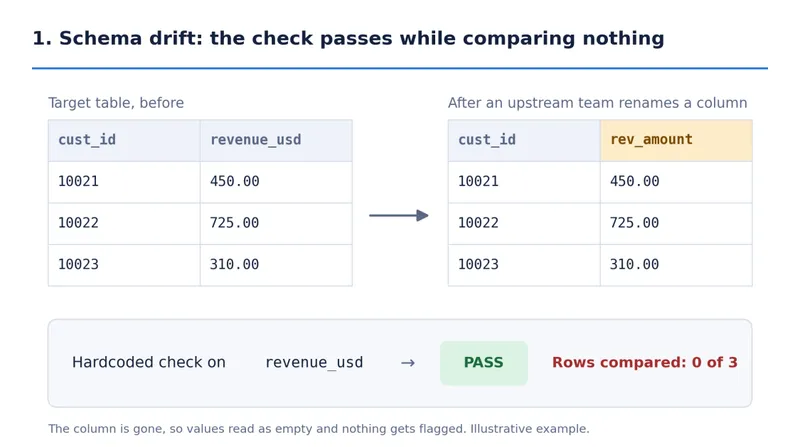
Fig. 1: A renamed column lets a hardcoded check pass while comparing zero rows (illustrative example).
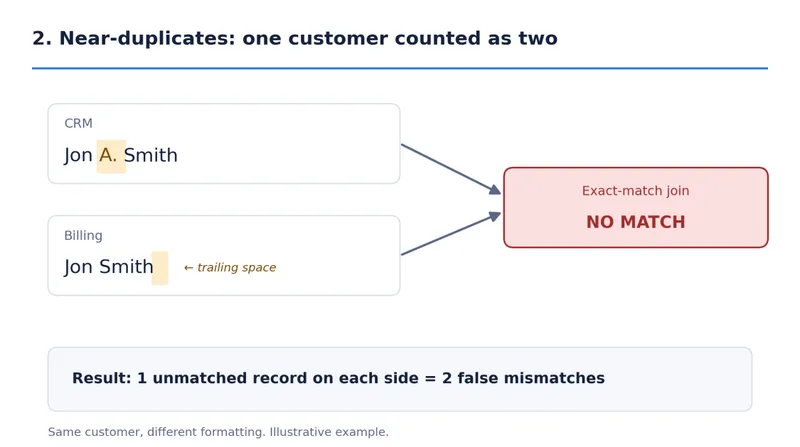
Fig. 2: Formatting differences make an exact-match join count one customer as two (illustrative example).
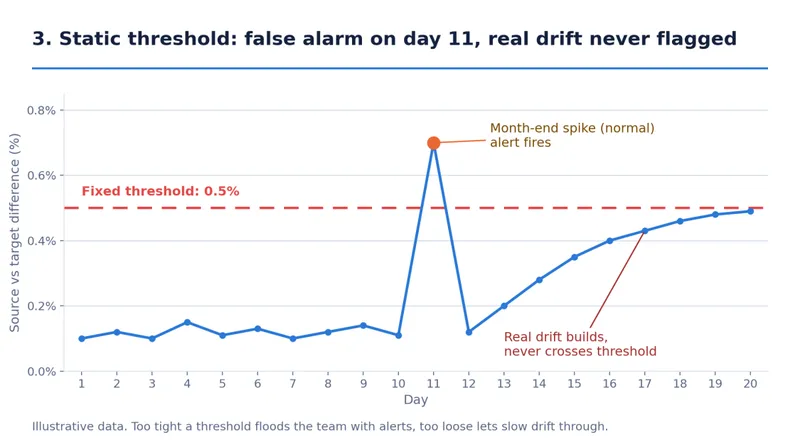
Fig. 3: A fixed 0.5% threshold fires on a normal month-end spike but misses slow drift (illustrative data).
All three come down to one issue. The check was built for the data as it looked on the day someone wrote it.
The Agentic AI Engine Behind 4DAlert Reconciliation
4DAlert approaches reconciliation as an agentic AI workflow. You configure a reconciliation once, through a step-by-step wizard or through APIs inside your data pipelines, and the 4DAlert engine runs a set of specialized AI agents on every run. Each agent owns one job, such as comparing, matching, learning baselines, detecting anomalies, or tracing a root cause, and passes its result on, so nobody has to rebuild the comparison.
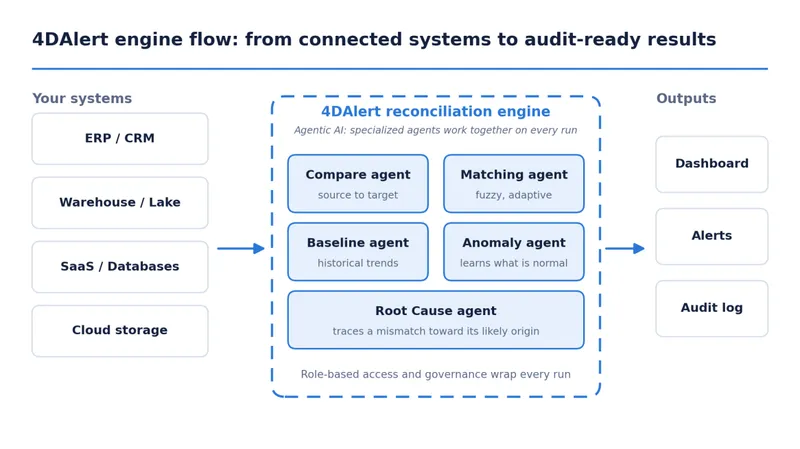
Fig. 4: How the agentic 4DAlert engine moves from connected systems to dashboards, alerts, and audit logs.
Behind the scenes, 4DAlert works through each run like this:
- Connect: 4DAlert links to databases, ERP and CRM systems, SaaS applications, and cloud storage through integrations and APIs, and works alongside your existing stack.
- Compare: The Compare agent runs source-to-target reconciliation, either as an aggregated comparison with default or per-column thresholds, or as a row-by-row comparison, with column mapping and condition filters.
- Match: The Matching agent recognizes records that represent the same entity despite differences in formatting or naming.
- Baseline and detect: 4DAlert learns what normal looks like from historical results, and the Anomaly agent surfaces deviations, so slow drift stands out without constant threshold retuning.
- Trace: The Root Cause agent points toward the likely origin of a discrepancy.
- Log: 4DAlert records every run and outcome, and role-based access controls who can view, configure, and run reconciliations.
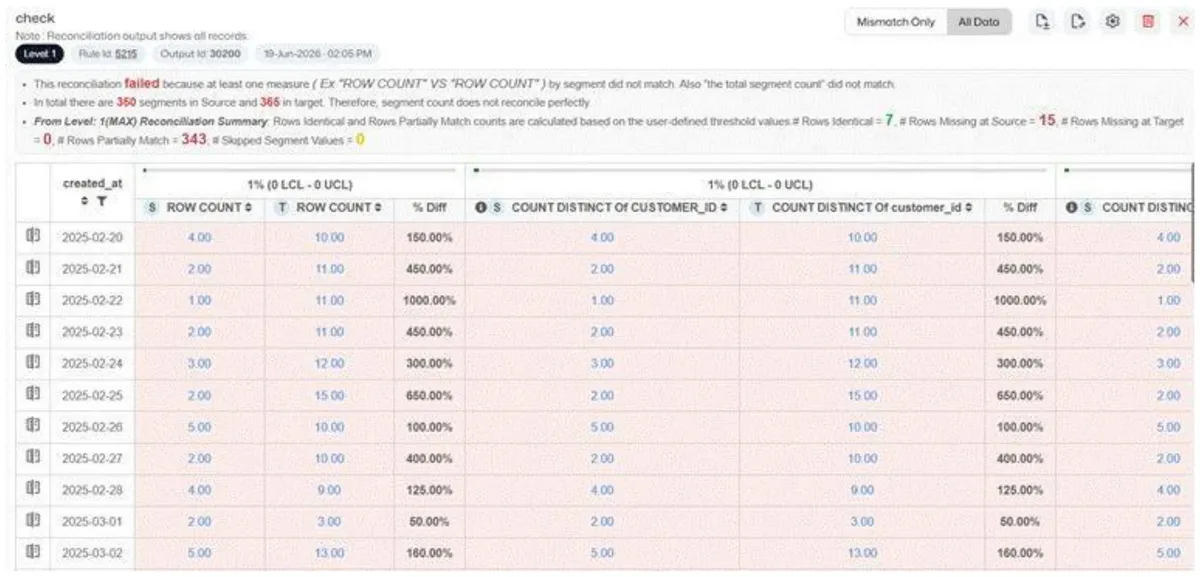
Fig. 5: A 4DAlert reconciliation compares source and target values by segment, showing row counts, distinct counts, and percentage difference against the threshold (demo data).
A row-level comparison in 4DAlert shows exactly where records disagree (illustrative example):
Customer ID |
Source revenue |
Target revenue |
Result |
10021 |
$450.00 |
$450.00 |
Match |
10022 |
$725.00 |
$700.00 |
Mismatch |
10023 |
$310.00 |
$310.00 |
Match |
One Screen for Every Reconciliation Run
The 4DAlert dashboard is where the engine’s work becomes visible. Instead of building a report by hand, your team sees every reconciliation in one place:
- Run Status: Displays reconciliation execution results, including pass/fail status, failed checks, and detected exceptions.
- Mismatch Details: Identifies source-to-target discrepancies at the record and column level, highlighting differences in values and affected records.
- Segment-Level Analysis: Groups reconciliation results by dimensions such as country or product line, enabling progressive drill-down into the segments driving discrepancies.
- Run History: Maintains execution records, reconciliation outcomes, and exception details to support traceability, troubleshooting, and audit requirements.
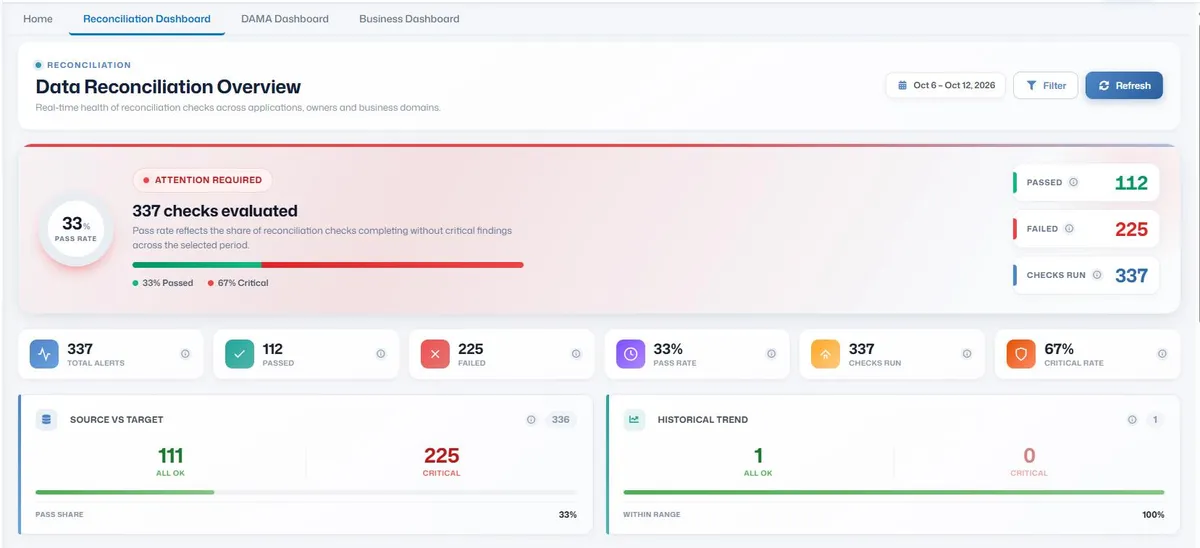
Fig. 6: The 4DAlert reconciliation dashboard shows passed and failed checks, pass rate, and critical rate in one view.
Tracing the Revenue Mismatch with Segment-Level Drill-Down
For agentic AI systems to make reliable decisions, enterprise data must remain consistent across source systems, transformations, and downstream platforms. 4DAlert combines automated reconciliation with AI-assisted investigation to detect discrepancies, isolate affected data, and help teams prepare reliable data for AI-driven workflows.
Using the quarter-end revenue scenario, the investigation follows this workflow:
- Detect: Run an aggregated source-to-target comparison between billing and warehouse revenue, applying configured tolerance thresholds to identify deviations that could affect downstream analytics or AI agents.
- Segment: Group reconciliation results by country to identify the geographic partition contributing to the revenue variance.
- Drill Down: Apply a second grouping, such as product line or category, to isolate the affected data segment and quantify the discrepancy.
- Investigate: Examine mismatched values, field mappings, and upstream schema or transformation changes to identify potential root causes, with AI-assisted analysis helping prioritize the investigation.
- Validate and Record: Re-run the reconciliation after remediation, verify that the discrepancy falls within defined thresholds, and retain execution results and exception records for traceability.
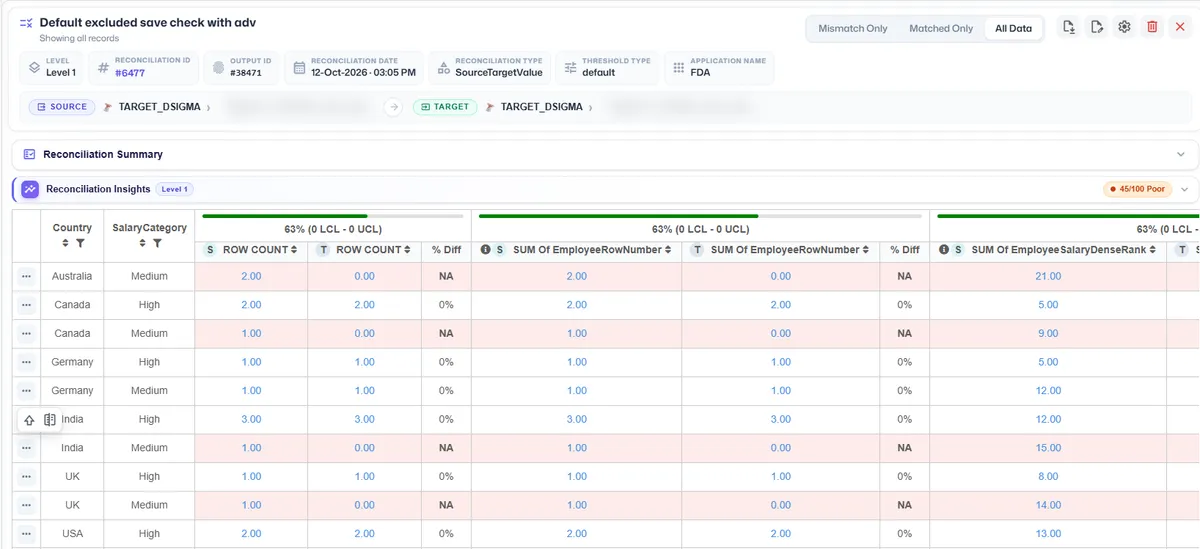
Fig. 7: 4DAlert groups results by country and a second level, here salary category, with mismatched segments highlighted (demo data).
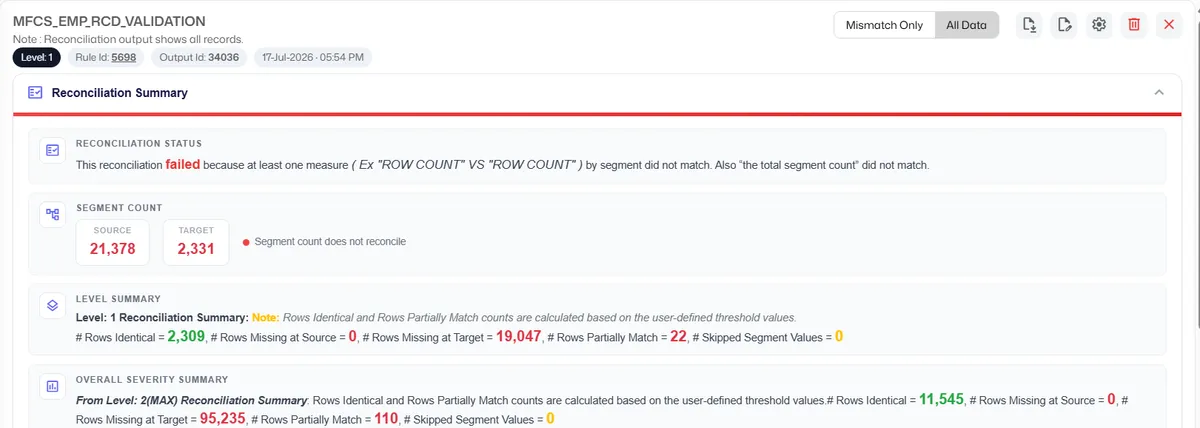
Fig. 8: The 4DAlert reconciliation summary shows status, segment counts, and rows identical, missing, or partially matched (demo data).
Without automation, this investigation means checking upstream changes one by one over several days. With 4DAlert, the team starts from a short list. Root cause tracing does not replace human confirmation. It gives the team a more focused starting point.
The outcome: A repeatable reconciliation process that helps maintain consistent, traceable enterprise data, giving agentic AI workflows a more reliable foundation for automated decisions.
See it on your own data. Pick one pair of systems you check by hand today and let 4DAlert show you what it finds. Book a 4DAlert demo.
Manual, Rule-Based, or Agentic: How the Approaches Compare
Approach |
What it catches |
Main limitation |
Traceability |
Spreadsheets and ad hoc SQL |
Whatever someone thinks to check |
Does not repeat or scale |
Little to none |
Custom script per system pair |
Specific, known mismatches |
Maintenance grows with every system |
Depends on the script |
Row counts and pipeline status |
Missing or extra rows |
Misses wrong values when counts match |
Limited |
Rule-based reconciliation |
Anything the rules define |
Exact matching and static thresholds need upkeep |
Strong |
4DAlert AI-driven reconciliation |
Mismatches, near-duplicates, drift |
AI-assisted decisions need clear logging and human oversight |
Runs and outcomes logged |
Rule-based checks still win where strict explainability matters, such as exact SKU-to-barcode validation. AI-driven reconciliation earns its place when data is large, varied, and constantly changing, and the two can work together.
Teams use 4DAlert as a data reconciliation tool for financial reconciliation, pipeline validation, data migrations, warehouse consistency, regulatory reporting, and master data sync.
Is Your Data Ready for Agentic AI?
A person reading a dashboard might notice a strange figure. An AI agent usually will not. Agentic AI acts on the data it receives, often without anyone reviewing each step, so bad data becomes a bad action at machine speed.
That makes AI data readiness a practical requirement. Data used by AI systems needs to be:
- Consistent: The same record agrees across every system that holds it.
- Complete: Missing records are caught before they reach a model or an agent.
- Stable: Schema changes are detected instead of silently breaking checks.
- Traceable: Every run is logged, so a decision can be explained later.
Continuous reconciliation with 4DAlert checks each of these. For teams building agentic AI workflows, it becomes a data-control layer between enterprise systems and automated decisions.
Before Your Agents Act, Check What They Act On
Reconciliation is no longer a quarterly clean-up. As AI agents take on more decisions, the data they act on must be checked continuously, explained when it breaks, and logged so it can be trusted later. The 4DAlert agentic reconciliation engine does that work across your systems, so your team investigates the right data instead of auditing everything.
Your AI agents are only as reliable as the data they act on. Pick one source-to-target comparison your team checks manually today and see how 4DAlert isolates the mismatch and points to a likely cause.
Frequently Asked Questions
What is source-to-target reconciliation?
It compares data in a source system with the matching data in a target system after movement, transformation, or migration, to confirm records and values transferred correctly.
What is row-level reconciliation?
It compares individual records between systems instead of only totals, so it can identify the specific records and fields behind a mismatch.
How is reconciliation different from data validation?
Validation checks data against rules such as format or range. Reconciliation checks whether related systems agree. Most teams need both.
Can 4DAlert identify near-duplicate records?
Yes. Its AI-driven matching recognizes records that represent the same entity despite differences in formatting or naming.
Does 4DAlert replace human review?
No. It reduces manual investigation, but high-impact discrepancies should still be reviewed by the right data, finance, or business team.
Do I need to replace my data stack to use 4DAlert?
No. 4DAlert works alongside existing databases, ERP and CRM systems, SaaS applications, cloud storage, and pipelines through integrations and APIs.
How do I get started?
Pick one high-risk pair your team checks by hand, such as billing and the warehouse. Map the columns, set filters and thresholds, review results with the data owners, and expand once the team trusts it.